For agencies and freelancers

Client site down at 2am.
Fix drafted at 2:01. Waiting for you at 9.

You cannot watch forty sites. You can barely watch four. So you find out from the client, you drop whatever you were billing for, and the afternoon disappears into someone else’s plugin update. Again.

One workspace, every client site · per-site rules · exportable reports · EU-hosted

The real problem

Every alert becomes an hour you cannot bill.

Monitoring told you site 43 is throwing fatals. Good. Now someone has to open it, work out which plugin update did it, write the fix, test it, and reassure a client who is already typing a second email.

On a retainer that hour is margin you just gave away. Off retainer it is an awkward invoice for work the client thinks should have been free. That is the actual economics of maintenance, and it is why agencies stop taking on sites long before they run out of demand.

Patcherly moves the cost from hours to a flat line item. The triage is done before you open the laptop. What is left is the decision, which takes a minute and is the only part a client is really paying you for.

A normal Tuesday, both ways

Today

09:12 client emails “the site is broken??” → 09:20 you stop what you were doing → 09:35 you find the log → 10:10 you find the plugin → 10:40 you patch and test → 10:55 you write the reassuring reply. Most of two hours, unbillable, and the client is still annoyed about the ninety minutes before you noticed.

With Patcherly

02:14 the update lands and the connector catches the fatal → 02:15 a fix is drafted with a rationale and a confidence score → 09:00 you read it, approve, and it applies and verifies. Four minutes of your morning, and the client never wrote the email.

Where it fits

You have already tried both alternatives.

Multi-site monitoring

The tools that watch your client fleet are good at what they claim: they tell you which site is throwing PHP errors, with the file, the line and the plugin version. Then they stop, because telling you is the product.

You still own every hour after the notification. Better-formatted problems are still problems.

White-label subcontracting

This one does buy back the hours. It buys them by putting a third party inside your client relationship with admin credentials, which is a conversation you would rather not have with a client under an NDA or a data-protection obligation.

Your margin improves, your risk surface moves. And you are no longer the one who decides what changes.

Patcherly takes the labour without taking the relationship. Nobody is issued a credential, nothing applies until you approve it, and the client keeps dealing with you.

How it works across a roster

Different clients, different leashes.

Your roster is not uniform, so the settings are not either. Everything below is per target, which means per client site.

Per-site trust levels

The hand-built ecommerce build stays in dry run. Twelve near-identical brochure sites can run with tighter automation. Same workspace, same bill.

Paths you declare untouchable

Monitored, excluded and patch-exclusion paths per site. That one legacy directory nobody understands can be permanently off limits. Docs →

Your team, your seats

Team members with real roles, view-only where you want it, and an audit trail that names who approved what. Docs →

Where your team already is

New errors, ready fixes, applied patches and rollbacks in Slack, Discord, Teams or a webhook — one channel per client if that is how you work. Integrations →

The client report writes itself

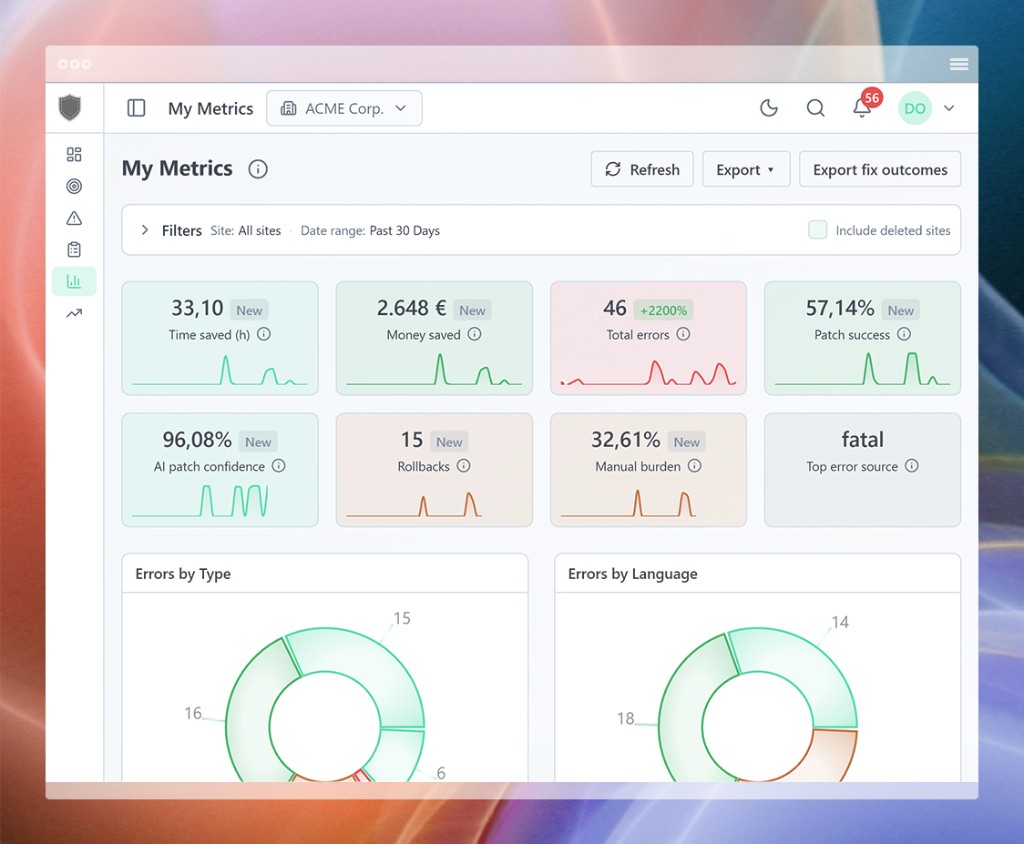
Every error carries a timeline: what broke, what was proposed, who approved it, when the connector ran, how it ended. The audit log names the actor on every action, and metrics export to CSV, XLSX or PDF.

Which turns the monthly “what exactly am I paying you for” conversation into an attachment. Hours saved, fixes applied, rollbacks, success rate — per site, for the period you pick.

Understanding metrics →  ·  Exporting metrics →  ·  Audit logs →
The client security review

Answers you can paste into the questionnaire.

Every new tool you introduce to a client roster eventually meets someone’s procurement form. These are the four questions that actually stall deals, and none of them require a call with us.

  • Where is data processed? EU, Frankfurt.
  • Is there a DPA? Published, Art. 28.
  • Who can access client code? Nobody. It stays on their server.
  • Is it used for AI training? No, and that is contractual.

Full detail on the security page, including the subprocessor list.

What agencies ask.

Running an unusual setup? Tell us about it — the founder reads every message and answers most of them personally.

How is this different from WP Umbrella, ManageWP or MainWP?

Those tell you which of your client sites is broken, and they do it well. None of them reduce the hours afterwards — every alert still becomes billable-or-unbillable developer time. Patcherly is the step after detection: it drafts the patch, waits for your approval, applies it on the client server, and rolls back if verification fails. Several agencies run both.

How is this different from white-label maintenance?

A white-label provider solves the hours problem by taking your client credentials and doing the work as you. That is fine until you have an NDA-bound client, a regulated one, or a GDPR processor chain you have to document. Patcherly needs no credentials for anyone: a connector sits on each client site, and you stay the person who presses approve.

Can I run all my client sites in one place?

Yes. Sites are targets inside a workspace, each with its own monitored paths, excluded paths, patch-exclusion rules and approval settings. A client with a hand-built theme can be locked to dry run while a stack of standard installs runs with tighter automation.

Can I show a client what was done?

Every error carries a full timeline — what broke, what was proposed, who approved it, when the connector ran, how it ended — and the audit log names the actor on every action. Metrics export to CSV, XLSX or PDF, so a monthly client report is an export rather than an evening.

Do my clients need Patcherly accounts?

No. The connector pairs to your workspace, not to them. Team seats are for your people; how you present the service to a client is your call. Seat and target counts vary by plan — the pricing page has current numbers.

What about a client who will not allow an AI near their code?

Run that site in dry run. It collects and proposes and applies nothing, which turns it into a diagnosis feed for your developers instead of an automation. You get the triage time back without changing a byte on their server.

Where does client data sit, and can I answer a procurement questionnaire with it?

EU-hosted in Frankfurt. Client code and pre-apply backups never leave the client server. The Art. 28 Data Processing Agreement and the subprocessor list are published rather than gated, which is usually the fastest way through a client security review.

Does it only do WordPress?

No — PHP, Python and Node.js too, through standalone connectors that can also run tests and restart the app after a fix. Useful when your client roster is not uniformly WordPress, which it rarely is.

Start with the client who breaks the most.

One site, in dry run, for a fortnight. It applies nothing and proposes everything, so all you are risking is finding out how much of your week that one roster entry has been quietly eating.

Full Pro plan for 30 days. No credit card. Free Personal plan after that, for as long as you like.

Mostly WordPress clients? The WordPress page covers Emergency Rescue, which keeps working when a site is too broken to load.

Checking API...
Checking AI Gateway...
Check status
⚠️ Setup Required