Production bugs, fixed before they ruin your week.

Patcherly watches your live sites and apps, works out what broke, and writes the fix. You approve it. It patches your server with one-click undo, or opens a GitHub pull request you merge when ready.

patcherly · error analysis & patching

Runs on the stacks you already ship

One-click connector setup. No SDK, no code integration needed.
Download, 1-command pairing, and you're done.

On WordPress or WooCommerce? It is a plugin, and it keeps working when the site does not.

Get the connector for your stack

Supported today

PHP · Laravel · Symfony · CodeIgniter WordPress · WooCommerce Python · Django · Flask · FastAPI Node.js · Express · Koa · NestJS · Next.js

On the way

TypeScript · Fastify · Bun Go Ruby on Rails Rust C++ · services & infrastructure Java / JVM Kotlin C# / .NET PowerShell · Azure & Windows Elixir Scala · Akka · Play
How it works

Six stages you can watch. Every one reversible.

Every error walks the same path, and every step is visible in your dashboard: who approved it, when the connector ran, how it ended. You decide when Dry-run is on, and which paths can never be touched.

Help center → How rollback works →

Watch, without the log archaeology

Pair a site once and your errors land in one inbox. No tailing files over SSH, no pasting stack traces into chat. You set the scope, and nothing outside it is ever read.

Understand what actually broke

Each error is packaged with the trace, the surrounding code and the environment it happened in. Secrets are stripped on your server before any of it travels. You get a plain-language summary, not a cryptic log line.

Draft a fix for your code, not a generic one

The analysis runs on that context pack alone. We hold no standing SSH or host credentials, and the suggestion reads like something a colleague who knows your stack would write. Optional Repo PRs use a GitHub App you install on repos you choose.

Show you the diff and a confidence score

Every proposal arrives with the exact change, a short explanation of why, and a confidence score. Anything under 90% needs a human, even with Auto Apply switched on. Nothing is patched blind.

Back up first, then verify live

The connector snapshots the affected files on your host before it writes anything. The moment the patch lands, a live check confirms your site still responds. If it does not, the snapshot goes straight back.

Leave a trail you can hand to a client

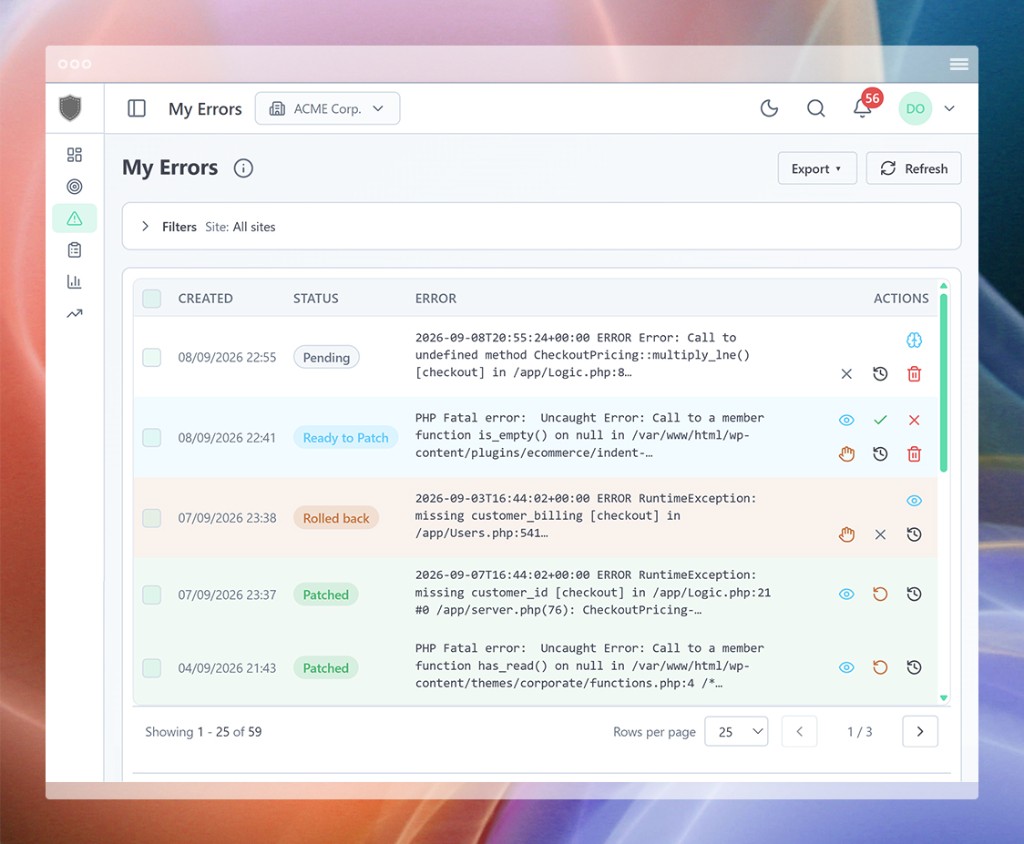
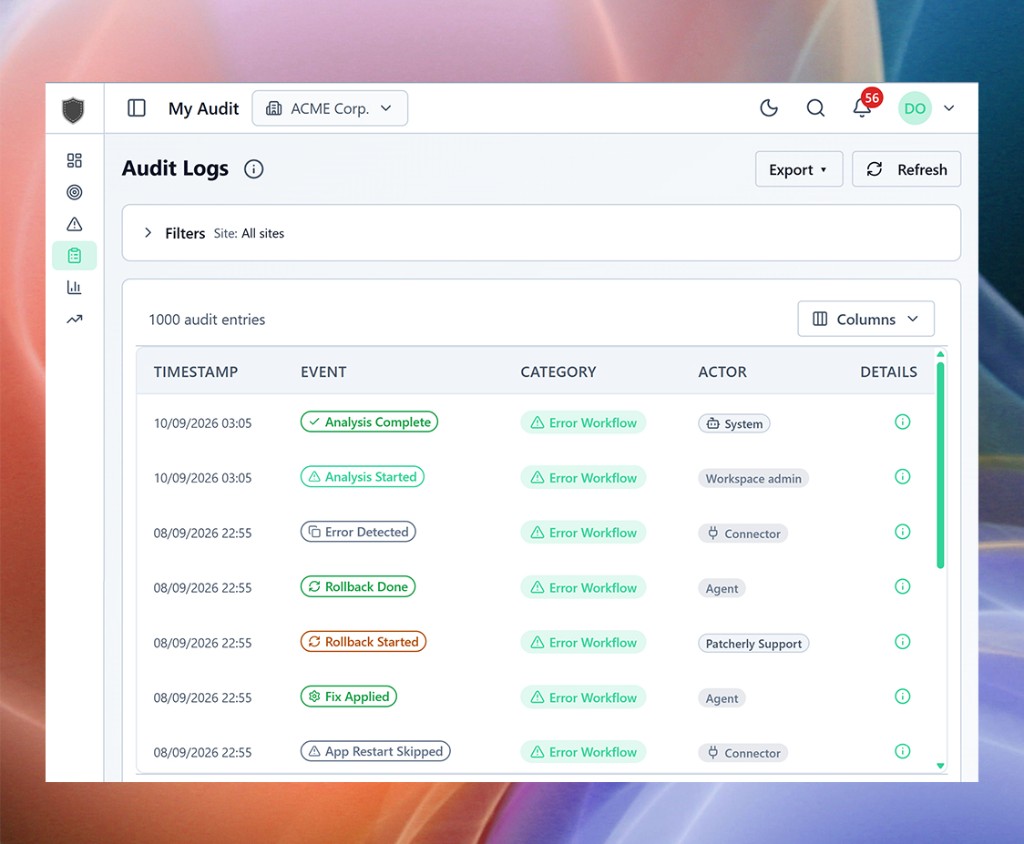
Who approved, what ran, how long it took, how it ended. All of it in your dashboard, exportable, and useful the next time someone asks what happened last Tuesday.

Your call, per site

Patch the live site, or just open a pull request.

Not every site should be patched in place. Each site gets its own delivery mode, and you can switch it whenever you like.

Every plan

Live Patch

The connector applies the approved fix on your server, after a local backup, then checks the site still responds. If it does not, the backup goes straight back. The fastest way to stop the bleeding.

Every plan

PR Only

Your server is never written to. The approved fix arrives as a pull request on your GitHub repo, on its own patcherly/ branch. Review it, let CI run, merge when it suits you. The error closes when the PR merges.

Every plan

Live Patch + PR

Fix production now and keep the repo in step. The patch applies live and the same change opens as a pull request, so your next deploy does not quietly undo it.

How Repo PRs work →

After a live patch, run your own steps

Python, Node.js and PHP apps often need more than a changed file: a process reload, a cache clear, a quick test run. Write those steps once in a short YAML manifest, and the connector runs them on your server after every successful patch.

  • Reload with systemd, PM2, Supervisor or Gunicorn
  • Clear framework caches, reset OPcache, rebuild autoload files
  • Run your smoke tests right after the patch lands
  • A failing step is reported back and locks automation for that site until you review it

App restart docs →

app-restart.yaml
# Sites → your site → App restart → Configure
version: 1
when: on_fix_success
working_directory: /srv/shop-api
steps:
  - name: reload_api
    run: pm2 reload shop-api
    timeout_seconds: 60
  - name: smoke_tests
    run: npm test -- tests/smoke
    timeout_seconds: 120
Inside the dashboard

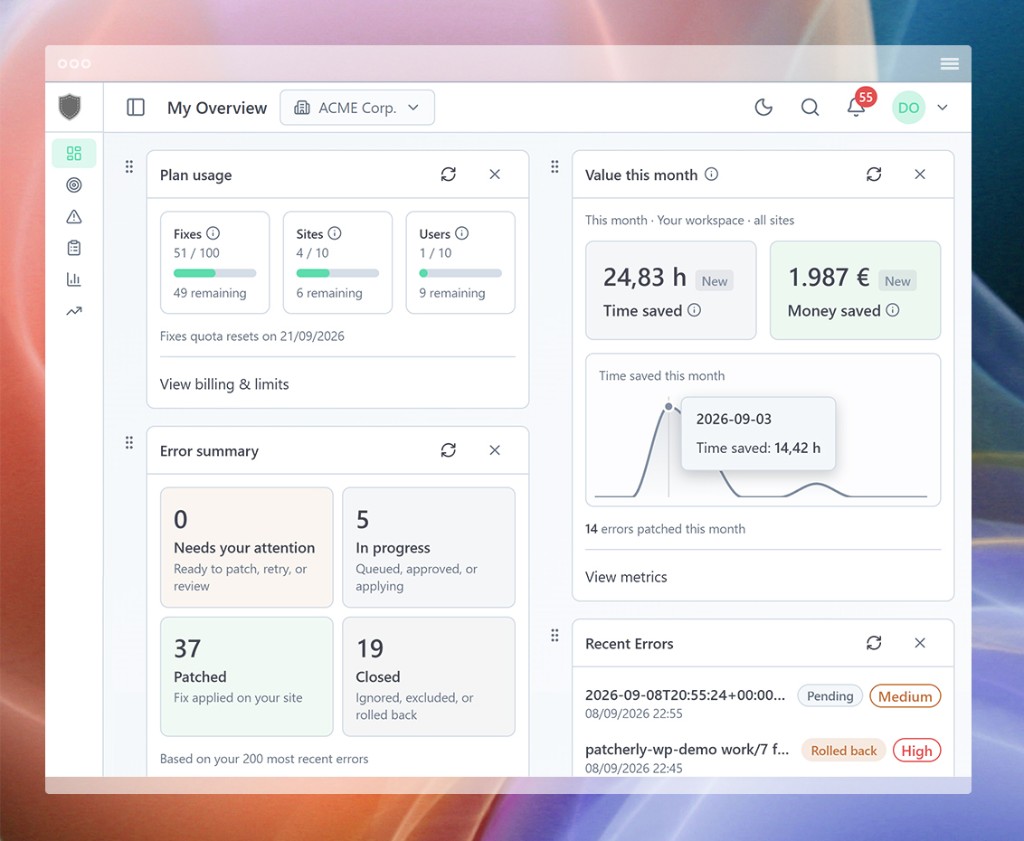
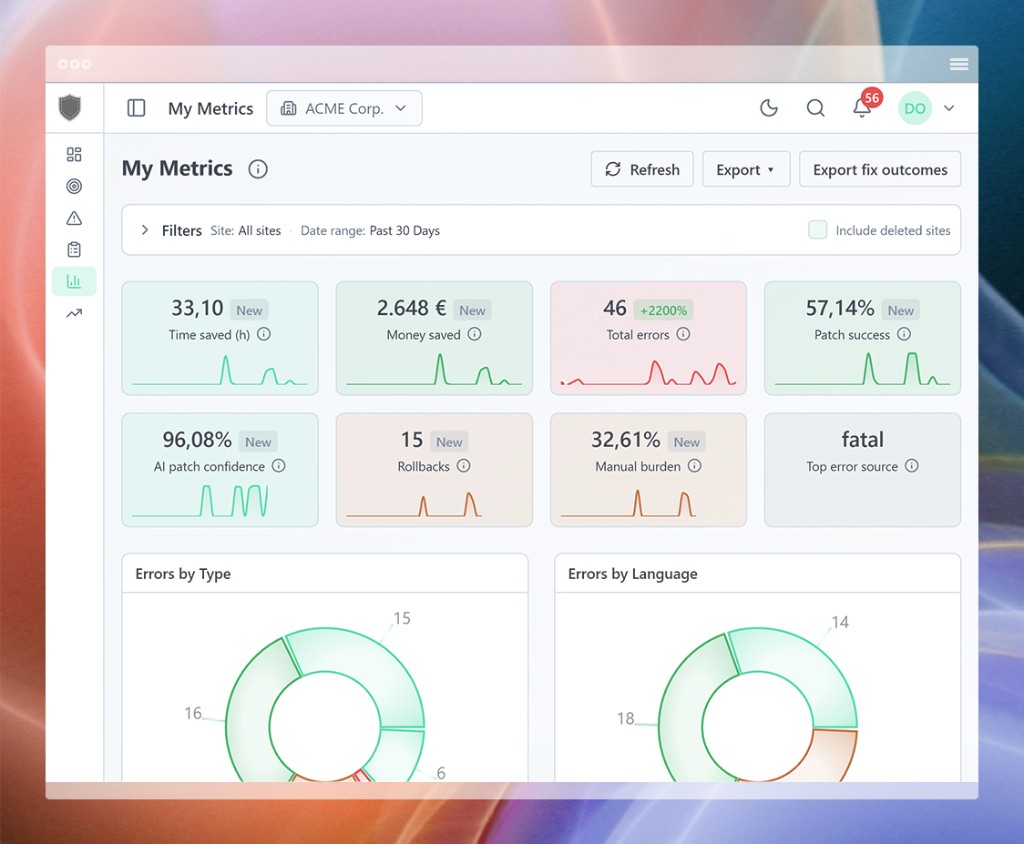
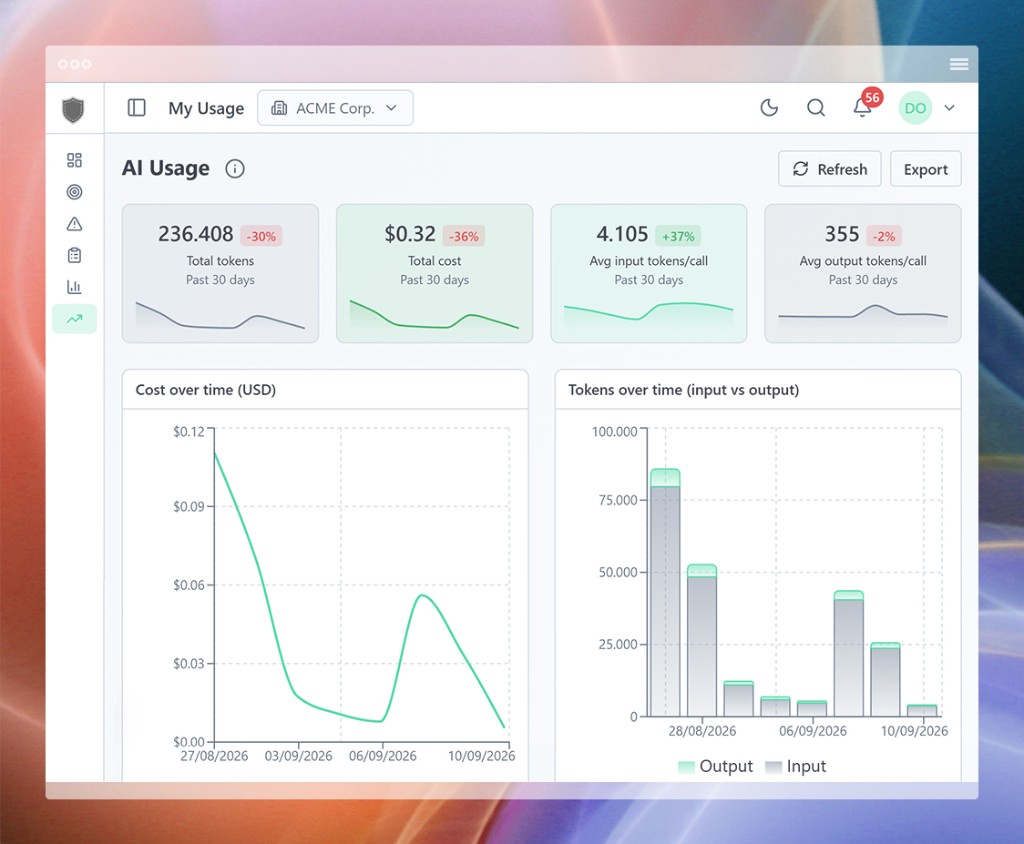
Errors, fixes, audit trail and savings, in one place.

Real fixes

From fatal to fixed, in under a minute.

Typos, missing null guards, wrong unpacking, unhandled async, the field an upstream API quietly stopped sending. Not glamorous, but they are what takes your site down and eats your evening.
These are the ones Patcherly is best at.

Node.js
async function getProfile(userId) {
  const user = await fetchUser(userId);
  // ✗ TypeError on undefined
  return user.profile.bio;
}
✗ TypeError: Cannot read properties of undefined
async function getProfile(userId) {
  const user = await fetchUser(userId);
  // Patcherly · optional chain
  return user?.profile?.bio ?? null;
}
✓ Patched · Confidence 97%
Python
def process_user_data(data):
    # ✗ TypeError if data is a dict
    name, age = data
    return f"{name} is {age}"
✗ TypeError: cannot unpack dict
def process_user_data(data):
    # Patcherly · safe dict access
    name = data.get('name', '')
    age  = data.get('age', 0)
    return f"{name} is {age}"
✓ Patched · Confidence 94%
PHP
function getUserProfile($userId) {
    $user = fetchUser($userId);
    // ✗ Fatal: missing null check
    $name = $user->getName();
    return ['name' => $name];
}
✗ Fatal Error: Call to method on null
function getUserProfile($userId) {
    $user = fetchUser($userId);
    // Patcherly · null-guard
    if (!$user) {
        return null;
    }
    $name = $user->getName();
    return ['name' => $name];
}
✓ Patched · Confidence 96%
WooCommerce
function process_payment($order_id) {
    $order = wc_get_order($order_id);
    // ✗ Fatal after gateway race
    $order->update_status('processing');
    return ['result' => 'success'];
}
✗ Fatal Error: Call to method on bool
function process_payment($order_id) {
    $order = wc_get_order($order_id);
    // Patcherly · guard missing order
    if (!$order) {
        return ['result' => 'failure'];
    }
    $order->update_status('processing');
    return ['result' => 'success'];
}
✓ Patched · Confidence 95%
Who it’s for

Three kinds of setup.
Same tool.

Developers and engineering teams

Get back the debugging hours nobody ever puts on a roadmap. Patcherly takes the repetitive triage so you can stay on the work you were hired for. Your PR flow and CI do not move an inch.

  • Dry run, path exclusions and approval rules per site
  • Time saved, resolution mix and exports in the dashboard

Agencies and small businesses

Look after more client sites without hiring. Fewer panicked calls, faster resolution, and a report you can send to a client without rewriting a thing.

  • Many sites in one workspace
  • Per-error timelines and rollups for client reports

Solo builders and freelancers

Your app keeps working while you sleep, travel, or focus on the next release. Set and forget where you trust it, full manual approval where you do not. Your call, every time.

  • Free plan that stays free, no card on file
  • EU-hosted by default when clients ask about compliance
Numbers, not promises

What are production bugs actually costing you?

At roughly 90k visits a month, a typical team burns about €8,500 a year on manual debugging, and Patcherly cuts that by 57%. At 300k the saving is around €24,000 a year. At 3M, north of €250,000.

Understanding metrics →    How we calculate savings →

≈ 3k visits/day average  ·  ≈ 1.1M visits/year

Per month
0 hours saved
0 € saved
Per year
0 hours saved
0 € saved

These figures assume you review and approve each fix yourself, so they include roughly 10 minutes of human approval per patch. With the Pro plan's Auto Apply feature on, a patch is applied and verified in under a minute.

Tools

Everything that plugs into Patcherly

Our lightweight connectors, chat alerts where you already work, native desktop apps, and the Patcherly MCP for your AI assistants & IDEs.

Site Connectors

WordPress, Node, Python, PHP. Install on your host, pair in one command, and keep code on your side of the wire.

Connectors →

Chat Alerts

Slack, Discord, Teams, or any webhook. New bugs, ready fixes, applies, and rollbacks land where your team already looks.

Integrations →

MCP for AI Tools

Cursor, VS Code, Claude, Codex. Triage errors and export workspace data from the assistant you already use.

MCP →

Desktop App

An app for your OS that delivers native notifications and quick actions for the events you care about.

Download →

The questions we get asked first.

Not answered here? Ask us directly, or dig into the help center.

Do I have to upload my repo or hand over SSH access?

No, and we would not want it. Patcherly runs through a connector you install on your own infrastructure. It sends us error context and writes patches locally. Nobody on our side logs into your servers, and we do not mirror your full repository into our cloud.

Can it change production files without asking me?

No. Every fix waits for your approval before anything is written, by default. Turn Dry-run on if you want a preview-only test. You can also use the Pro feature "Auto Apply", which allows the patch to be applied automatically after a high-confidence analysis, and can always be turned off again in one click. Or keep the live server out of it entirely: on any plan, a site set to PR Only gets its fixes as GitHub pull requests instead (Repo Pull Requests).

What happens if a patch turns out to be wrong?

The connector takes a local snapshot before every apply. If the patch fails or the health check comes back unhappy, the original is restored automatically. Manual rollback is always one click away, for as long as the snapshot exists on your disk.

Is my code used to train AI models?

No. We use third-party AI for inference only, to draft a fix from a scrubbed error context. Nothing you send is used to train or fine-tune anyone’s foundation model. We do remember whether a fix worked, but only inside your own workspace. On Core and Pro, that history helps future suggestions avoid what already failed for you.

How is this different from Copilot, Cursor or Sentry?

Those tools are excellent at their own jobs. Copilot and Cursor help you write code, Sentry and Datadog show you what broke. Neither closes the loop on the server. Patcherly picks it up from there: live bug detection, enriched and customized AI-drafted fix, your approval, live site apply, auto site testing, rollback.

Where does my data live, and is there a DPA?

The app, API and database are EU-hosted (Frankfurt) by default. The DPA is published at /legal/data-processing-agreement and accepted at sign-up, and every subprocessor is listed at /legal/subprocessors. You can delete your account yourself from the dashboard.

What does the free trial actually include?

The full Pro plan for 30 days: every feature unlocked, no credit card, no auto-charge when it ends. If you do nothing, your workspace simply moves to the free Personal plan and keeps running. Nothing is deleted.

More answers at help.patcherly.com →

Spend next week shipping, not on last week’s bug.

Point Patcherly at your ugliest error log and see what it does. Two minutes to install, and we never mirror your repository.

Full Pro plan for 30 days. No credit card. Free Personal plan after that, for as long as you like.

Checking API...
Checking AI Gateway...
Check status
⚠️ Setup Required