Django works with DEBUG=True and breaks with DEBUG=False
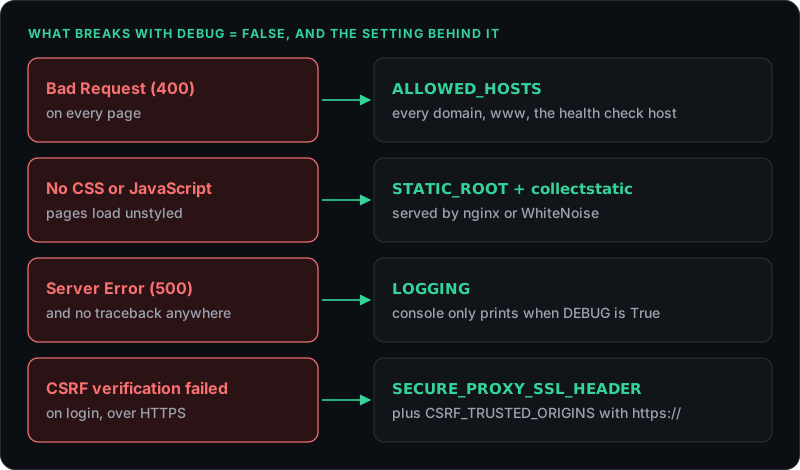
Same code, different behaviour. DEBUG changes far more than the error page, and each of the usual production symptoms maps to exactly one setting. Here is which one, and how to check them all before you deploy.
Locally, everything works. On the server, with DEBUG = False, the home page returns
Bad Request (400), or it loads without a single stylesheet, or it shows
Server Error (500) and nothing appears in any log. Same code, same database. DEBUG changes far more
than the error page, and each of those symptoms maps to exactly one setting.
What changes when DEBUG is False?
Four things change that matter here. Django starts enforcing ALLOWED_HOSTS strictly. The
staticfiles app stops serving your CSS and JavaScript. Errors render your 404.html and
500.html instead of the yellow debug page. And the default logging stops printing errors to the
console. Each one is the right behaviour for production, and each one produces a symptom that looks like a bug.
Why does every page return Bad Request (400)?
Because the Host header of the request is not in ALLOWED_HOSTS. With DEBUG on and the list empty,
Django quietly accepts localhost, 127.0.0.1 and [::1]. With DEBUG off, an
empty list rejects every request. Django does log the reason, assuming your logging works:
Invalid HTTP_HOST header: 'www.example.com'. You may need to add 'www.example.com' to ALLOWED_HOSTS.List every name the site is reached by, and read them from the environment so staging and production can differ:
ALLOWED_HOSTS = os.environ.get("ALLOWED_HOSTS", "").split(",")
# ALLOWED_HOSTS=example.com,www.example.com
Three hosts get forgotten all the time: the www version of the domain, every subdomain (a leading
dot, as in .example.com, covers them all), and the internal address your load balancer uses for
health checks. That last one is the nasty one. Health checks get a 400, every instance is marked unhealthy, and
the whole site goes down because of a probe.
Why did the CSS disappear?
Because Django only serves static files itself while DEBUG is on. In production, something else has to do it:
your web server, a CDN, or WhiteNoise inside the app. The steps are the same either way. Set
STATIC_ROOT, run python manage.py collectstatic --noinput on every deploy, and serve that
folder:
# nginx
location /static/ {
    alias /srv/app/staticfiles/;
}
With WhiteNoise, add whitenoise.middleware.WhiteNoiseMiddleware directly after
SecurityMiddleware and the app serves its own static files, which is often simplest on platforms
without a separate web server. User uploads in MEDIA_ROOT are a different story: WhiteNoise does not
serve them, so they need the web server or object storage.
If you use ManifestStaticFilesStorage, or WhiteNoise's compressed variant of it, a missing file is a
500 rather than a broken link. The traceback reads
ValueError: Missing staticfiles manifest entry for 'css/site.css'. Either collectstatic was not run
for this release, or a template references a file that does not exist. runserver --insecure can
serve static files with DEBUG off for a quick local test, but it does not work with the manifest storage, and it
has no place in production.
Why is there a 500 but no traceback?
Because Django's default logging only prints errors to the console while DEBUG is on. With DEBUG off, the default
configuration emails error reports to the people in ADMINS. If ADMINS is empty or
email is not set up, the traceback goes nowhere at all. That is why the 500 seems to come from nothing.
Add a logging configuration that sends errors to stderr, where Gunicorn, uWSGI, systemd or Docker will pick them up:
LOGGING = {
    "version": 1,
    "disable_existing_loggers": False,
    "handlers": {
        "console": {"class": "logging.StreamHandler"},
    },
    "loggers": {
        "django": {"handlers": ["console"], "level": "ERROR"},
    },
}
That covers server errors and the Invalid HTTP_HOST header reports from the previous section. Where
stderr ends up for your process manager is listed in
the Python section of the 500 post.
One more trap lives in the error page itself. Django renders 500.html with an empty context. Anything
in that template that relies on request, the logged-in user or a context processor renders empty, and
a custom template tag that needs them can fail outright. Keep 500.html standalone, with plain markup,
inline styles and no base template that assumes a request.
Why does login fail with "CSRF verification failed"?
Usually because Django sits behind a proxy that handles HTTPS, and nobody told Django the request was secure.
Since Django 4.0, CSRF checks compare the browser's Origin header with the origin Django thinks it is serving.
Django sees plain HTTP, the browser says https://, and the 403 page explains the mismatch:
Origin checking failed - https://example.com does not match any trusted origins.
Tell Django which header your proxy uses, and list any other origins that post forms to the site. Entries in
CSRF_TRUSTED_ORIGINS must include the scheme:
SECURE_PROXY_SSL_HEADER = ("HTTP_X_FORWARDED_PROTO", "https")
CSRF_TRUSTED_ORIGINS = ["https://example.com", "https://www.example.com"]
Only set SECURE_PROXY_SSL_HEADER if your proxy really sets that header and strips any copy sent by
the client, or a visitor can simply claim to be on HTTPS. The same setting cures the endless redirect loop you
get with SECURE_SSL_REDIRECT = True behind a proxy, which is the same misunderstanding wearing a
different error.
How do you catch all of this before you deploy?
Run Django's own deployment check against your production settings:
DJANGO_SETTINGS_MODULE=config.settings.production python manage.py check --deploy
It flags an empty ALLOWED_HOSTS, DEBUG left on, a weak SECRET_KEY and the missing
security headers, in a few seconds. Then make staging run with DEBUG = False and the same settings
as production. A staging site with DEBUG on cannot catch a single thing in this post, which defeats the point of
having one.
The other classic Python surprise is the app that never starts at all, covered in ModuleNotFoundError in production. And when nginx shows a 502 because Gunicorn is not answering, the steps are in the 502 post.
The Python connector guide covers setup, and the security page explains what leaves your server and what never does.
Found something wrong in here? Tell me.