Passing null to parameter is deprecated: where did the null come from?
The deprecation names the line that received the null, and that is rarely the line that created it. Here is how to trace the value back, the three honest fixes, and why a blanket cast is the wrong one.
Deprecated: trim(): Passing null to parameter #1 ($string) of type string is deprecated, a few
thousand times a day, starting the week your host moved the site to PHP 8.1. The pages still load. The line in
the message is rarely the one to fix, because the null was created somewhere else and only noticed there.
What does "passing null to parameter" mean?
It means a built-in PHP function that expects a string, an integer, a float or a boolean was given
null instead. Before PHP 8.1, built-in functions quietly converted that null into an empty string
or a zero. strlen(null) returned 0, trim(null) returned an empty string,
and nobody noticed. PHP 8.1 still does the conversion, but it now raises a deprecation every single time.
Your own functions never had that leniency. A user-defined function with a string parameter has
always thrown a TypeError when it receives null, in every PHP 8 version. The change in 8.1 makes
built-in functions announce that they will start behaving the same way:
function slugify(string $title): string { /* ... */ }

slugify(null);   // TypeError, in every PHP 8 version
trim(null);      // "" plus a deprecation, from PHP 8.1
Why did it appear after a PHP upgrade?
It appeared after the upgrade because the code was always passing null, and PHP 8.1 is the first version that
says so. Nothing in your code changed. The usual suspects are the string functions every project calls
constantly: trim(), strlen(), str_replace(), strpos(),
explode(), htmlspecialchars(), strtolower(), preg_match(),
json_decode() and urlencode(). Most codebases trip on the same dozen.
The parameter in the message tells you which argument was null. #1 ($string) is the first one.
str_replace(): Passing null to parameter #3 ($subject) means the text being searched was null,
not the search or the replacement. Small detail, and it saves you from staring at the wrong variable.
Why does the file in the message look innocent?
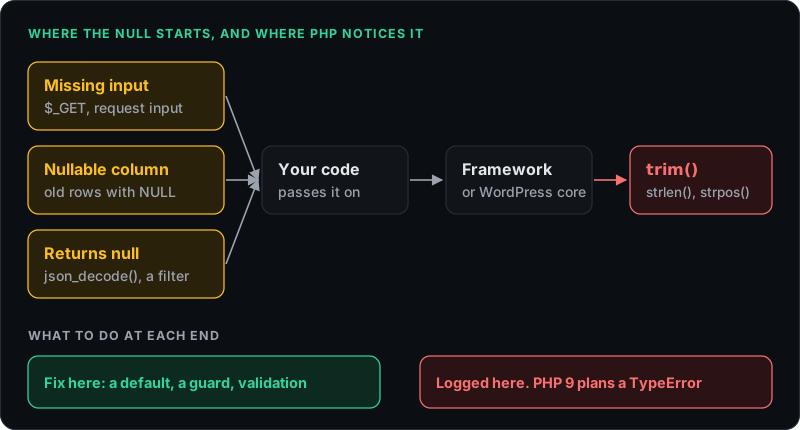
The file and line in the deprecation are where the null was used, not where it was created. That file is very
often a framework helper or WordPress core, doing nothing wrong. A plugin hands WordPress a null, WordPress
passes it to trim(), and the log blames a file in wp-includes that nobody should edit.
The null almost always starts in one of a few places:
- Missing input. A query string or form field that is not always sent, read with
$_GET['page'] ?? null,filter_input(), or Laravel's$request->input('page'), all of which give you null when the value is absent. - A nullable database column. Most rows have a value and a handful of old ones do not, so the deprecation only fires for those records. That is why it looks random.
- A function that returns null on failure.
json_decode()on invalid JSON is the classic, followed closely by a WordPress filter callback that forgot itsreturnstatement and passes null to everything downstream.
How do you find where the null comes from?
You find it with a stack trace, and deprecations do not come with one by default. On a staging copy, add a small error handler that logs the trace for this deprecation only:
set_error_handler(function (int $no, string $msg, string $file, int $line): bool {
    if (str_contains($msg, 'Passing null to parameter')) {
        error_log($msg . "\n" . (new \Exception())->getTraceAsString());
    }
    return false; // let PHP handle it as usual
}, E_DEPRECATED);
Read the trace from the top. The first frame is the built-in function, the next few are usually framework code,
and the first frame inside your own code or your plugin is the one that matters. From there, follow the variable
back to where it was set. In WordPress, the handler fits in a must-use plugin. Recent Laravel versions have this
built in: set LOG_DEPRECATIONS_CHANNEL=single and LOG_DEPRECATIONS_TRACE=true in the
staging .env and the traces land in storage/logs.
Static analysis finds many of them without running anything. PHPStan at its stricter levels reports a value that
may be null going into a string parameter. Rector goes the other way: its
NullToStrictStringFuncCallArgRector rule wraps the arguments in (string) casts for you.
That is a reasonable tool for legacy code you are about to retire, and a snooze button anywhere else.
What is the right fix?
The right fix stops the null where it is created, and handles a genuinely missing value on purpose. Three options, in order of preference:
1. Stop the null at the source. Give the column a default, check the array key, validate the input once at the boundary of your app. One fix there clears every deprecation downstream of it, which is why a log with three thousand lines often needs three changes.
2. Decide what "missing" means at the point of use. trim($title ?? '') is fine
when an empty string really is the right answer. Written like that, it is a decision someone can read and
question later, which a silent conversion never was.
3. Make the type honest. If null is a legitimate value, let your own function accept
?string and branch on it explicitly, instead of pushing it into a function that expects text.
Vendor code is the exception. If the deprecation comes from a plugin or a package you do not maintain, update it first, because PHP 8.1 has been out since 2021 and most maintained projects fixed these long ago. If no fixed version exists, report it upstream and keep the log entry rather than patching the vendor folder, which the next update will overwrite.
What happens in PHP 9?
The plan in the original RFC is that PHP 9 turns these deprecations into a TypeError, matching
user-defined functions. Every call that only warns today becomes a fatal error and a 500 for that request. There
is no PHP 9 release date yet, so this is not tonight's emergency. It is a dated notice, though, and it shares a
deadline with the dynamic property
deprecation from PHP 8.2. Clearing both in the same pass is the cheapest way to do it.
The more immediate reason is the log. Thousands of harmless notices hide the one fatal that matters, the same problem described in the dynamic property post. If a PHP upgrade also leaves you with a white screen, the real error is waiting in the log, and getting it out of a 500 shows where to look. And if you would rather something else read that log and draft the fixes, that is what Patcherly does, on WordPress and plain PHP alike.
Found something wrong in here? Tell me.