Laravel 500 error after deploy: the usual suspects, in order
Laravel deploys fail in a small number of predictable ways, and the log names the cause almost every time, as long as Laravel was able to write it. Here is the order to check, with the exact message for each one.
The deploy finished, the pipeline is green, and every page says 500 | Server Error. It worked five
minutes ago on your laptop. Laravel deploys fail in a small number of predictable ways, and the log names the
cause almost every time, as long as Laravel was able to write it.
Where is the real Laravel error?
The real error is in storage/logs/laravel.log, or in a dated file such as
laravel-2026-11-03.log if your log channel is daily. With APP_DEBUG=false,
which is correct for production, the browser only ever gets the generic page. Read the end of the file right
after reproducing the error:
tail -n 100 storage/logs/laravel.log
In containers, set LOG_CHANNEL=stderr so the errors end up in docker logs next to
everything else. If the log file is empty or missing, Laravel could not write it, and that is a diagnosis in
itself: read the PHP-FPM and web server error logs instead, then go straight to the next section.
Why can laravel.log not be opened in append mode?
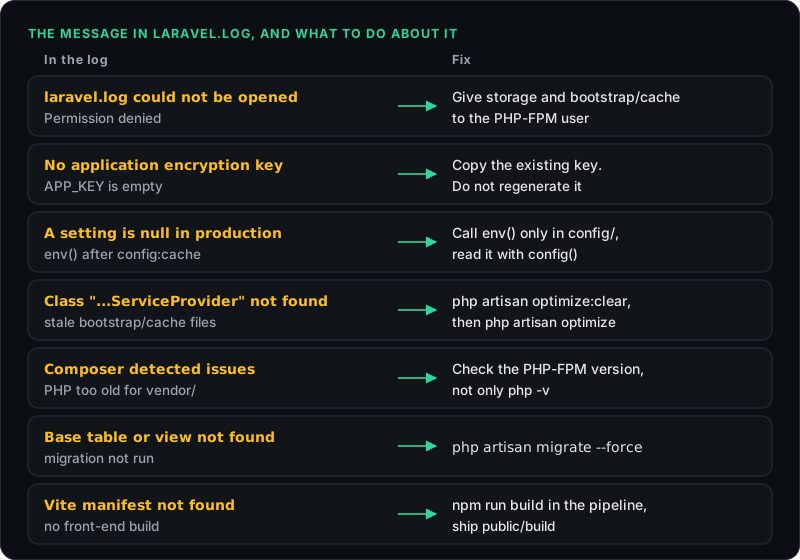
The stream or file "/var/www/app/storage/logs/laravel.log" could not be opened in append mode:
Failed to open stream: Permission denied
This means the user running PHP-FPM cannot write to storage. Laravel needs write access to both
storage and bootstrap/cache, and the user that needs it is the one running PHP, often
www-data, not the account you deploy with.
The classic trigger is an artisan command or a cron job running as root. The first write of the day creates a fresh log file owned by root, and from that moment the web process cannot append to it. With daily logs, this turns into a surprise just after midnight. Fix the ownership, then stop running artisan as root:
sudo chown -R deploy:www-data storage bootstrap/cache
sudo chmod -R ug+rwX storage bootstrap/cache
The capital X adds execute permission to directories only. Avoid chmod 777. It makes
the error go away, and it also lets any process on the server rewrite the files in
bootstrap/cache, which Laravel loads as PHP on every request.
What does "No application encryption key" mean?
No application encryption key has been specified means APP_KEY is empty in the
environment the server actually reads. Usually the production .env was never created, or the
variable is missing from your hosting platform's environment settings.
If the app has run in production before, copy the existing key from the old server or your secrets manager. Run
php artisan key:generate only on a brand-new install. A new key logs every user out, and anything
encrypted with the old key, such as encrypted model attributes or stored tokens, can no longer be read. For a
planned rotation, Laravel 11 and later accept the old key in APP_PREVIOUS_KEYS.
Why does env() return null in production?
Because php artisan config:cache ran during the deploy, and once the configuration is cached,
Laravel no longer loads the .env file. Every env() call outside the files in
config/ then returns null. It works locally because nobody caches config on a laptop.
// app/Services/Billing.php: null once the config is cached
$secret = env('STRIPE_SECRET');

// config/services.php
'stripe' => ['secret' => env('STRIPE_SECRET')],

// app/Services/Billing.php: works with or without the cache
$secret = config('services.stripe.secret');
Move every env() call into a config file and read the value with config(). The
opposite trap catches people too: you change a value in .env on the server and nothing happens,
because the old value is still in bootstrap/cache/config.php. Run
php artisan config:cache again after every change.
Why is a class suddenly not found?
Usually because a cached file points at code that is not on the server. Laravel caches its list of discovered
packages and service providers in bootstrap/cache/packages.php and services.php. Those
files may come from a machine with development packages installed. If production then ran
composer install --no-dev, Laravel tries to boot a provider that is not there:
Class "Barryvdh\Debugbar\ServiceProvider" not foundClear every cache and build them again on the server itself:
php artisan optimize:clear
php artisan optimize
Then make sure those files never travel. Laravel's default .gitignore already excludes them, but an
FTP upload of the whole project folder copies them anyway.
Is it Composer, or the PHP version?
Two quick checks rule both out. Failed opening required '/var/www/app/vendor/autoload.php' means
Composer never ran on the server, or the vendor folder was not shipped with the release. Run it the
production way:
composer install --no-dev --optimize-autoloader
Composer detected issues in your platform: Your Composer dependencies require a PHP version means
the PHP serving the site is older than your packages need. The trap is that the command line and PHP-FPM are
often different versions on the same server, so php -v over SSH says 8.3 while the website runs on
8.1. Check the version the web server uses, with a temporary phpinfo() page or the name of the
running FPM service. The CLI has its own php.ini too, which is why
memory limits also differ between the two.
What about migrations, the database and Vite?
The last three each come with an unmistakable message.
SQLSTATE[42S02]: Base table or view not found, orColumn not found: the code expects a migration that has not run. Runphp artisan migrate --force. The flag is required in production, where Laravel otherwise stops to ask for confirmation.SQLSTATE[HY000] [2002] Connection refused:DB_HOSTpoints at the wrong place. Inside a container,127.0.0.1is the container itself, not the database, so use the service name. On a plain server,localhostand127.0.0.1are not interchangeable, for the same reasons covered in the WordPress database post.Vite manifest not found at: /var/www/app/public/build/manifest.json: the front-end assets were never built for this release. Runnpm ciandnpm run buildin the pipeline and shippublic/buildwith the release.
What does a safe Laravel deploy look like?
A safe deploy runs the same steps in the same order every time, on the server or in the image you ship:
composer install --no-dev --optimize-autoloader
php artisan migrate --force
npm ci && npm run build        # or ship public/build from CI
php artisan optimize           # caches config, routes, views and events
sudo systemctl reload php8.3-fpm
php artisan queue:restart
Finish with a check that touches the real stack: a request to a page that reads from the database, from outside
the server. If that returns a 500, the answer is in laravel.log and you know exactly which release
put it there. For the same hunt on any stack, PHP, Python or Node.js, see
getting the real error out of a 500.
Setup takes one command with the PHP connector, and the pricing page lists what Free and Pro each include. If you are weighing it against the monitoring you already run, who actually fixes the bug after it ships shows where each kind of tool stops.
Found something wrong in here? Tell me.